OFFLINE-FIRST ACCOUNTING & POS FOR PAKISTANI BUSINESSES

Sell, stock and keep the books.
Even when the internet drops.

From retail counters and factory floors to freelance desks—manage sales, inventory, khata, and audit-ready double-entry books even when the internet drops.

Free during beta. No card, no payment. Works in any modern phone or computer browser.

Business overview
ReceivablesCustomer balancesAR
PayablesSupplier duesAP
Financial reportingLedger, trial balance, P&L, balance sheet and cash flow
InventoryStock & valuationINV
SalesPOS & invoicesPOS

BUILT FOR THE WAY YOU WORK

One set of books. Three ways of working.

Retail & Wholesale

A queue at the counter, a customer asking for udhar, and the internet just dropped.

  • Bill at the counter offline: tap or scan items, take cash, card or a split payment, and print a 58 mm or 80 mm receipt.
  • Party-wise khata: every credit sale lands on the customer's account, with credit limits and a WhatsApp or SMS reminder you review before it is sent.
  • Stock moves with every sale and purchase, and low-stock items are flagged for reorder.
Start Retail Beta Retail in detail →

Mid-Sized Manufacturing

Raw material in, finished goods out, and the cost has to land in the right accounts.

  • Bills of materials with planned scrap, and production orders that issue raw material and receive finished goods in the batch sizes you set.
  • Raw material and finished goods valued separately; cost of goods sold posted by double entry on every sale.
  • Supplier ledgers, purchase orders and an audit trail on every posting. A posted entry is corrected by a reversal, never edited.
Set Up Factory Books Manufacturing in detail →

Freelancers & Agencies

Clients in Lahore and London, invoices in rupees and dollars, and no stock to count.

  • Service invoices without inventory screens: bill a service, and see what every client owes.
  • Projects with reviewed time entries, billed at your rate onto the client's invoice.
  • Invoices in USD, GBP or EUR at the exchange rate you record for the date, with your books kept in PKR, plus expenses and a profit & loss your tax consultant can work from.
Create Freelance Workspace Freelancing in detail →

TRY IT HERE

Tap a sale. Watch the books post themselves.

This is the rule the app follows on every transaction: each event posts a balanced journal, stock and cost of goods sold move with every sale, and the khata updates by itself. Switch the internet off and keep selling; everything uploads when it comes back. An illustration in your browser: nothing here is saved.

All synced

Opening books: stock Rs 20,000 and cash Rs 5,000, put in by the owner.

Latest journal entries
  1. Opening balancesDr Inventory 20,000 · Dr Cash 5,000 · Cr Owner's capital 25,000
Trial balance
AccountDebitCredit
Cash5,000
Khata (customers owe)
Inventory20,000
Suppliers (payable)
Owner's capital25,000
Sales
Cost of goods sold
Total25,00025,000

Debits = credits · In balance

Gross profit
Rs 0
Bilal's khata
Rs 0
Stock at cost
Rs 20,000
64capabilities14modules25reports5languagesOfflineselling keeps going
Works offline, syncs laterAutomatic double-entry posting58 mm and 80 mm receiptsEnglish, Urdu, Sindhi, Punjabi, PashtoPIN lock for the books

MADE FOR PAKISTAN

Built for how business is done here.

YOUR LANGUAGE

The same books in five languages.

Staff can use the app in the language they read, and the books underneath stay exactly the same. Pick a language to see the app's own labels. The Urdu, Sindhi, Punjabi and Pashto wording is awaiting review by native speakers.

CashLedgerTrial BalanceProfit & LossBalance SheetcustomerssuppliersOffline

FOR YOUR ACCOUNTANT

You sell on the phone. Your accountant reviews on a desktop.

Add your Chartered Accountant, auditor, tax consultant or munshi as a user with the accountant role. They sign in from any desktop browser and work from the same posted ledger you sell from: no USB drives, no photos of registers on WhatsApp.

  • Trial balance, profit & loss, balance sheet, cash flow and the general ledger, from real postings.
  • Every figure traces back to the journal and the sale, bill or payment that made it.
  • Period close and locks, so a closed month stays closed.
  • Their access is limited to their role, and you can remove it at any time.

YOUR DATA IS SAFE

"Will clearing my browser history delete my accounts?"

No. Your books are kept on Shop Account's server, and your phone or computer keeps a working copy so you can sell offline. Everything that has synced stays safe whatever happens to the device, and the copy is rebuilt when you sign in again. The one thing to wait for: sales made offline stay in the upload queue until the internet returns, so don't clear the browser while the app shows sales waiting.

Sealed on the device

Set a PIN and the copy on your device is sealed with it, so it stays between visits. Without a PIN, the browser keeps the copy only until you close it.

Synced when you reconnect

Sales and payments made offline upload by themselves when the connection returns, each one once, and post to the same books.

PIN lock and staff roles

Lock the books on a device with a PIN. Give staff their own sign-in, so a cashier sells without seeing the books.

Export in one click

Download reports and lists as CSV, which opens in Excel, or print and save statements as PDF. The full backup holds every record of your business.

INSTALL THE APP

Put Shop Account on your home screen.

Shop Account installs from the browser like an app: its own icon, full screen, and it opens offline. No Play Store download needed.

Open the app

Android (Chrome)

Open the app, tap the ⋮ menu, then Install app or Add to Home screen.

iPhone (Safari)

Open the app, tap the Share button, then Add to Home Screen.

Computer (Chrome or Edge)

Open the app and click the install icon at the right of the address bar.

ON THE ROADMAP

Not built yet. We say so.

EXPLORE SHOP ACCOUNT

Find the information you need.

01

Features

Explore accounting, POS, inventory, AR/AP, ledger, tax and reporting capabilities.

View features →
02

Solutions

Retail and wholesale, manufacturing, and freelancers and agencies, in detail.

Find your workflow →
03

Help Center

Get practical guidance for setup, transactions, reports, sync and troubleshooting.

Get help →
04

Security

Understand authentication, tenant context, HTTPS, offline awareness and safe-use practices.

Security overview →

THE REAL APP

See it before you sign up.

These are screenshots of the app itself, taken from a sample shop with invented data.

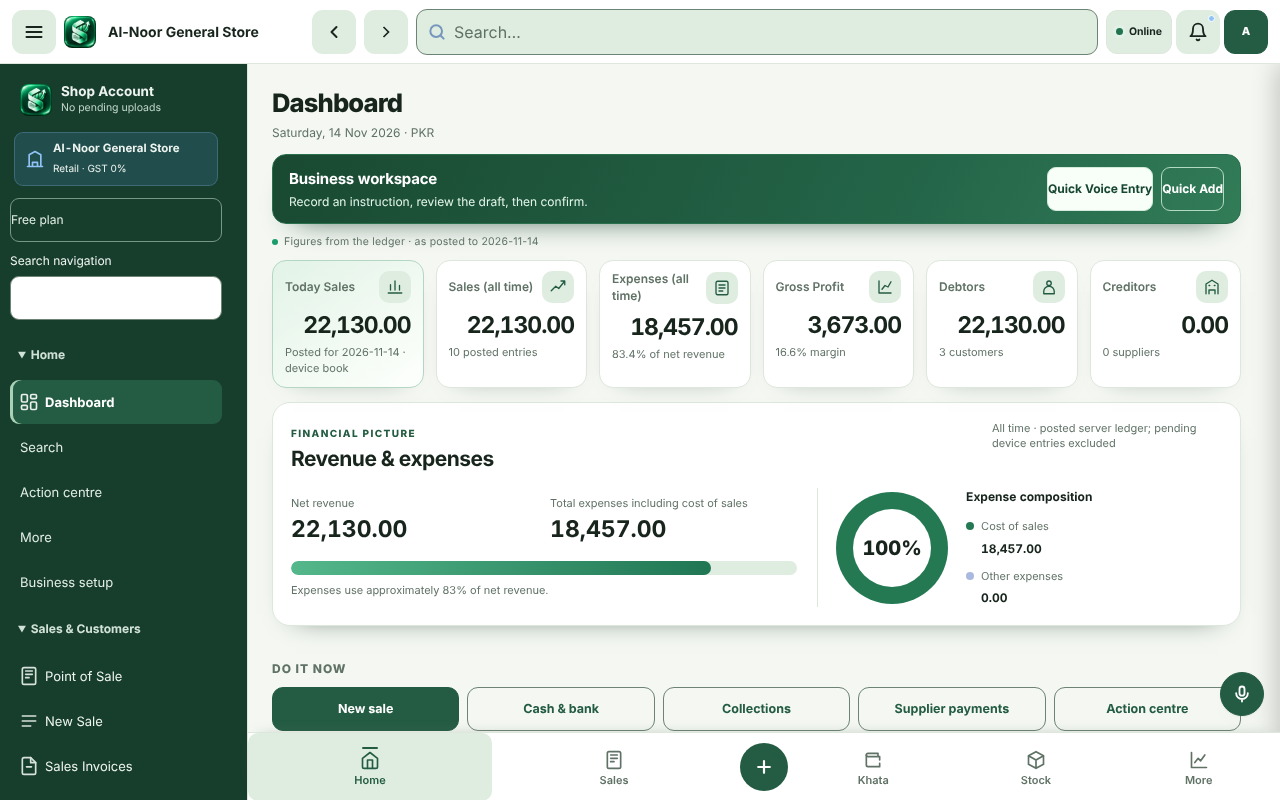
Shop Account dashboard for a sample shop: today's sales, all-time sales, expenses, gross profit, money owed by customers and to suppliers, all read from the ledger.
The dashboard reads every figure from the posted ledger.
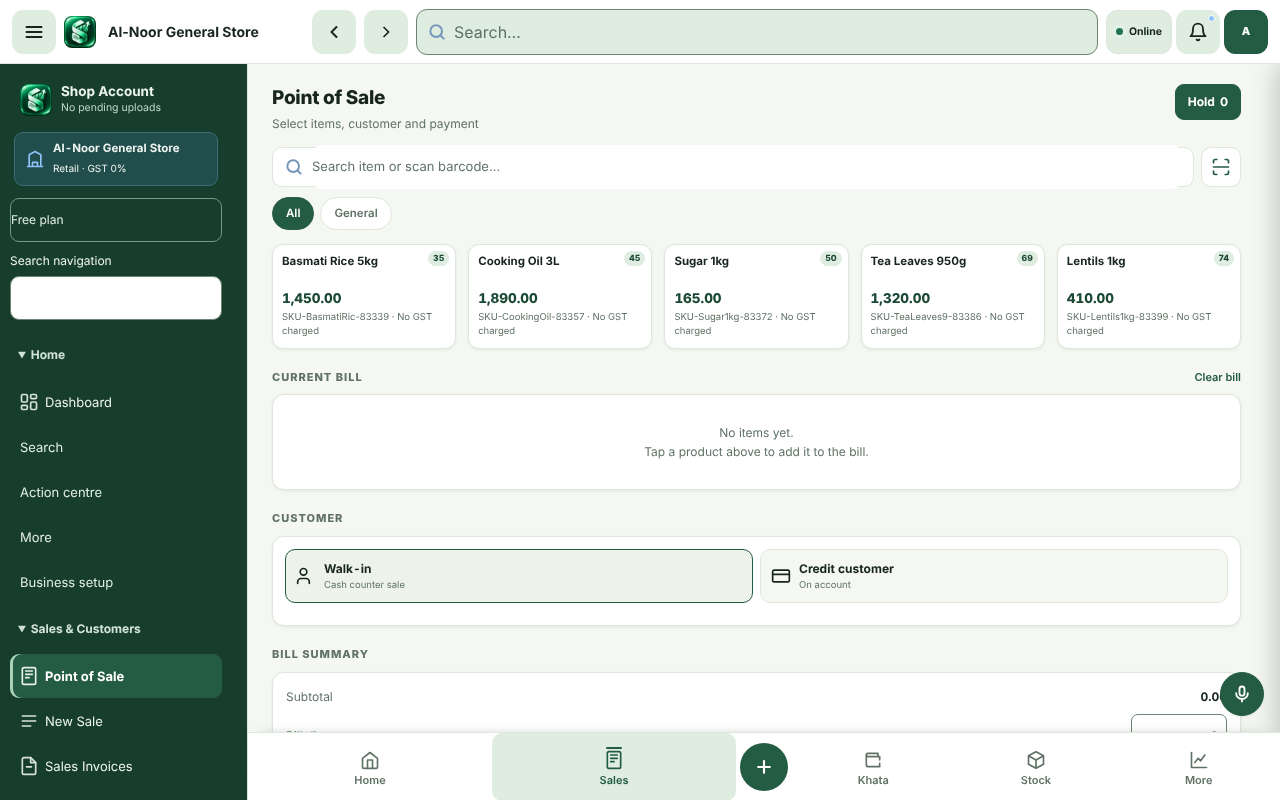
Shop Account point of sale: product cards with price, stock and tax label, the current bill, and a choice of walk-in or credit customer.
The till: tap products, choose walk-in or credit, print a 58 or 80 mm receipt.
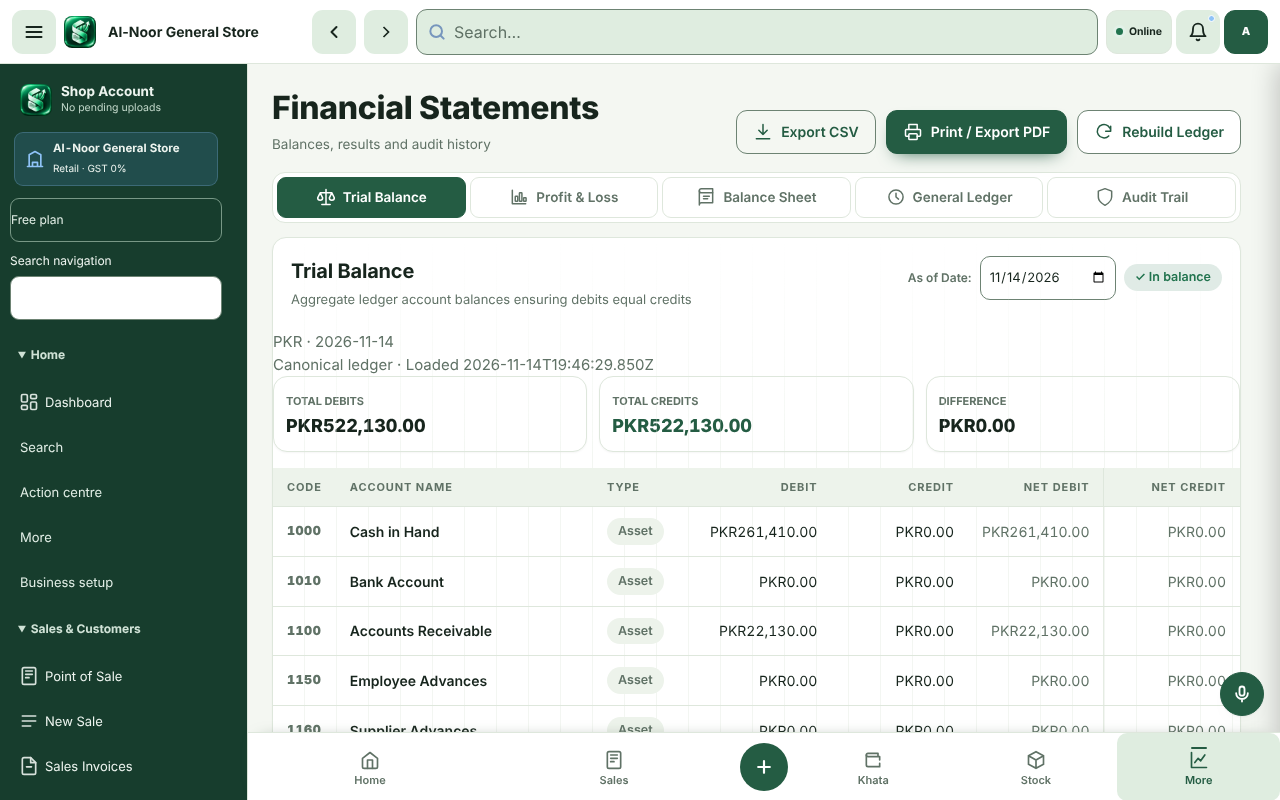
Shop Account trial balance for a sample shop showing total debits and credits of PKR 522,130.00 each, a zero difference and the In balance badge.
Debits equal credits: the trial balance from real postings.
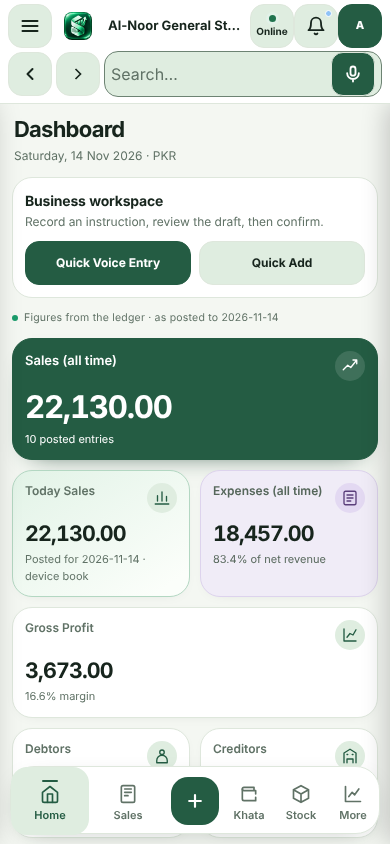
Shop Account on a phone: the dashboard with sales and expense cards and the bottom navigation with Home, Sales, Khata, Stock and More.
On a phone: the same books, with a bottom bar for daily work.

FREE BETA

Start with your real business.

Create an account in a few minutes. Shop Account is free during the beta, and account owners will be told well before any paid plan applies.

Start free beta