Dashboard
Most owners only learn how the day went after counting the cash drawer. The dashboard puts today's sales, cash, money customers owe you and money you owe suppliers on one screen. You see where the business stands before you close the shop.
 Shop Account
PRODUCT FEATURES
Shop Account joins the counter, the stock room and the accounts. You record the work once; the double-entry books, stock and reports follow on their own, online or offline.
EVERYTHING IN SHOP ACCOUNT
This list is generated from the product's own catalogue, so it shows what the app does today. Core accounting is included for every business; switch on the modules your business needs, and everything posts to the same double-entry books.
Showing all 64 capabilities
Items with SKU, barcode, selling and purchase price, scanned by a barcode scanner or the phone camera.
InventoryServices you sell without stock: a price, a tax code and an income account.
ServicesGroup items so stock, sales and reports read the way your shelves do.
InventorySell and buy in the units you use: pieces, kilograms, metres, cartons.
InventoryPrice lists and customer prices alongside each item's standard price.
InventoryStock on hand by item and location, valued at cost.
InventoryStart with the stock you already have, at its cost, in balanced opening entries.
InventoryWrite damaged or found stock off or on, with a reason, posted to the books.
InventoryMove stock between locations without changing its value.
InventoryCount the shelves and post the difference against the book quantity.
InventoryPrint invoices and receipts with your business name, address and your own terms at the foot.
IncludedCredit and cash sales that post revenue, tax, stock and cost of goods sold together.
IncludedA till that keeps selling offline: hold and recall bills, split payments, 58 mm and 80 mm receipts, cashier sessions.
Point of SaleQuotations that turn into orders or invoices without re-typing.
IncludedCustomer orders and delivery challans that move stock once, when it leaves.
IncludedReturns and credit notes, with a reason, that reverse stock, revenue and the khata.
IncludedLine and invoice discounts, kept separate from the price so reports stay true.
IncludedSupplier bills and purchases that raise stock and what you owe in one step.
PurchasingPurchase orders to suppliers, and goods received into stock against them.
PurchasingReturn goods to a supplier and reduce what you owe them.
PurchasingCustomer khata with credit limits, opening balances and contact details.
IncludedSupplier accounts with opening balances, tax status and what you owe.
IncludedCustomer and supplier statements and ageing, tied to the receivable and payable accounts.
IncludedRecord money received against the exact invoices it settles, or on account.
IncludedPay suppliers against the bills you owe, with approvals if you want them.
IncludedRent, bills and running costs, including scheduled ones, into the right accounts.
IncludedA cashbook per drawer or account, with every movement from a posted entry.
IncludedBank accounts in your books, with deposits, withdrawals and transfers.
IncludedImport a bank statement file, match its lines to your books, and see what is left.
IncludedA ready chart of accounts you can extend, with the control accounts protected.
IncludedManual journal vouchers for what no form covers, balanced before they post.
IncludedBring in balances from your old books, balanced to opening equity.
IncludedClose months and years; a closed period refuses new postings.
IncludedWorking papers that combine the books of related businesses.
IncludedCorrect a posted entry with a reversal, never by editing history.
IncludedA fixed asset register, with depreciation posted to the books.
Advanced AccountingBudgets by account, compared with what actually happened.
Advanced AccountingTag income and costs by project or cost centre, and report profit for each.
Advanced AccountingInvoices, bills and expenses that repeat on a schedule.
Advanced AccountingDocuments in USD, GBP, EUR and more at dated exchange rates, with the books in your currency.
IncludedYour business details, tax registration, currency, fiscal year and the modules you use.
IncludedSales tax codes and rates, withholding rules and tax withheld by your customers.
IncludedStaff sign-ins with roles: owner, admin, manager, accountant, cashier, employee, viewer.
IncludedWho did what and when, for every financial change.
IncludedPrivacy requests and compliance evidence handled as reviewed cases.
IncludedBring in items, customers, suppliers, accounts and opening figures from a file.
IncludedDownload reports and lists as CSV, which opens in Excel, or print them as PDF.
IncludedA full backup of your business you can download, and restore when you need it.
IncludedWebhooks to your other systems, and bank statement import.
IncludedSpeak a transaction instead of typing it, in your own words.
IncludedOptional · needs setting upType or say "sold 5 bags to Bilal on credit"; you review the entry before anything posts.
IncludedOptional · needs setting upWhat each product takes, in your batch size, with planned scrap per material.
Manufacturing & MRPWhat open production orders will need, against what is in stock.
Manufacturing & MRPAttendance and leave, reviewed before they reach the payroll run.
PayrollEmployees, their pay, allowances and deductions.
PayrollSalary advances recovered from later payroll runs.
PayrollProduction orders that issue raw material, receive finished goods and carry their cost into stock.
Manufacturing & MRPPayroll runs, payslips and payment batches, posted to the books.
PayrollA booking calendar with staff availability, for salons and clinics.
AppointmentsProjects, tasks and reviewed time, billed onto the client's invoice.
ProjectsTables, saved menu prices, kitchen orders and a reviewed till checkout.
RestaurantCustomer vehicles and equipment, job cards, labour and parts, and service history.
WorkshopMedicines tracked by batch and expiry. Switched on after a country and licence review.
PharmacyAfter reviewProperties and assets, rental contracts, rent and deposits.
RentalNothing matches. Try another word, or ask us.
REPORTS
Every figure comes from the same journal entries, so the reports agree with each other; when one cannot be proved it says so instead of showing a number.
SELL & COLLECT
Set up customers and items, record sales through the supported sales/POS workflow, monitor receivables and record collections.
BUY & MANAGE STOCK
Maintain suppliers and items, use the supported purchasing workflow, then review payable and stock effects rather than maintaining isolated totals.
ACCOUNT & REVIEW
Review journal activity and the general ledger, validate the trial balance, then move into financial reporting.
FEATURE DIRECTORY
Most owners only learn how the day went after counting the cash drawer. The dashboard puts today's sales, cash, money customers owe you and money you owe suppliers on one screen. You see where the business stands before you close the shop.
A queue at the counter cannot wait for a slow connection. The till keeps selling offline, can hold a bill and bring it back, and prints receipts on 58 mm or 80 mm thermal printers. Each sale reduces stock and posts its journal and cost of goods sold, with nothing to re-enter later.
Paper khata books get lost, smudged and argued over. Each customer has a running credit ledger, and a receipt can be set against the exact invoices it pays. You always know who owes what, and you can show them the statement.
Supplier bills are easy to pay twice or forget entirely. Record a purchase and it raises stock and what you owe in one step, and payments are matched to the bills they settle. Supplier balances stay correct without a separate spreadsheet.
Stock counted by eye drifts away from what was really sold. Quantities move automatically with every purchase, sale and adjustment, and stock is valued with the costing method you choose at setup. Margins on the reports are based on what the stock really cost you.
Totals that cannot be traced are hard to trust. Every figure in Shop Account comes from journal lines you can open and follow back to the sale, purchase or payment that made them. When something looks wrong, you can find out why.
Edited records hide mistakes. Posted entries are never changed in place: a correction is a reversal plus a new entry, and both stay in the history. Your accountant sees exactly what happened and when.
A spreadsheet can look right and still not add up. Because every posting is balanced double entry, debits always equal credits, and the trial balance shows it at any date. You start each report from books that agree.
Owners need profit and position, not just a sales total. Profit and loss, balance sheet and cash flow are built directly from the ledger for any period you choose. You can see whether the business is actually making money.
Old debts get forgotten until they cannot be collected. Ageing reports split what customers owe and what you owe suppliers by how overdue it is. You know whom to call first and which bills to pay next.
Getting sales tax wrong is costly. Your tax registration status is set when you create the business, and tax rates need review before they are used. If the business is not registered, no tax is charged.
Internet drops and phones get borrowed. Entries are saved on the device first and synced when the connection comes back, and a PIN can lock the books on the device. Work continues safely, and figures stay private.
THE REAL APP
These are screenshots of the app itself, taken from a sample shop with invented data.
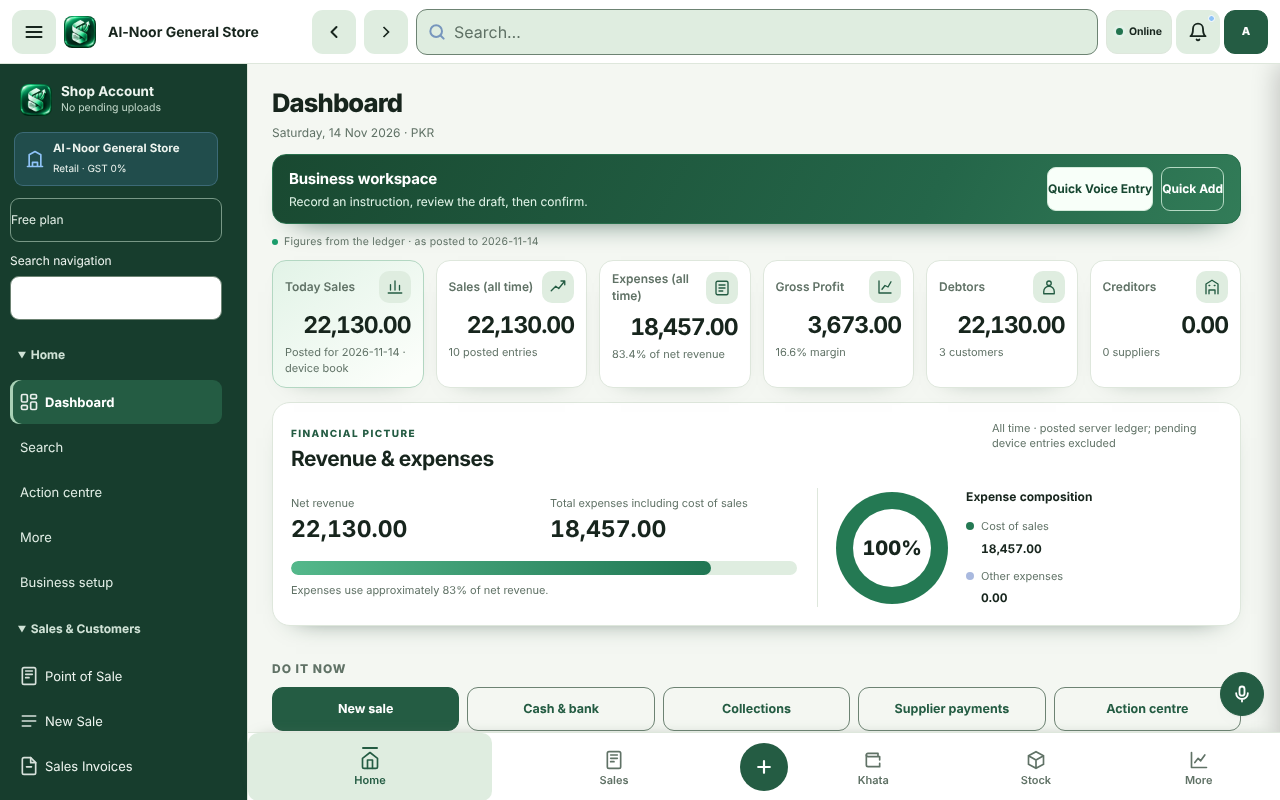
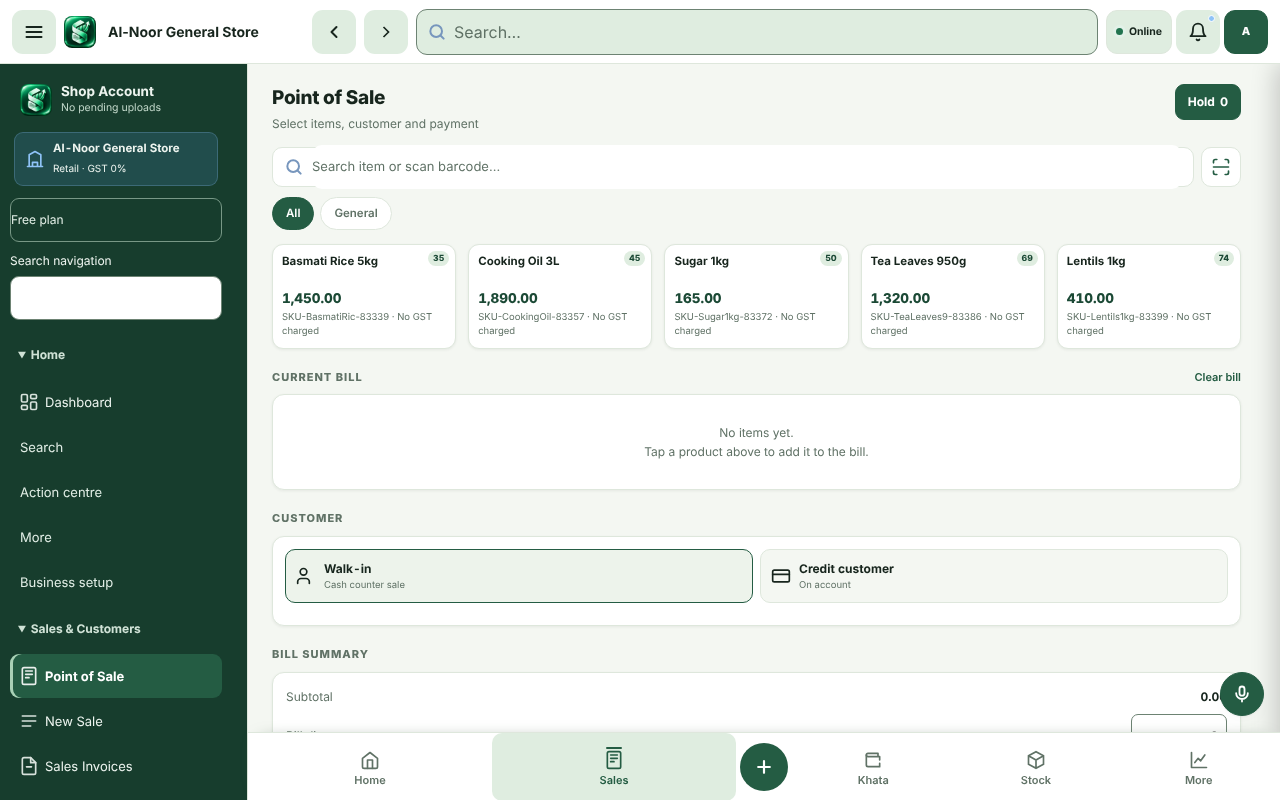
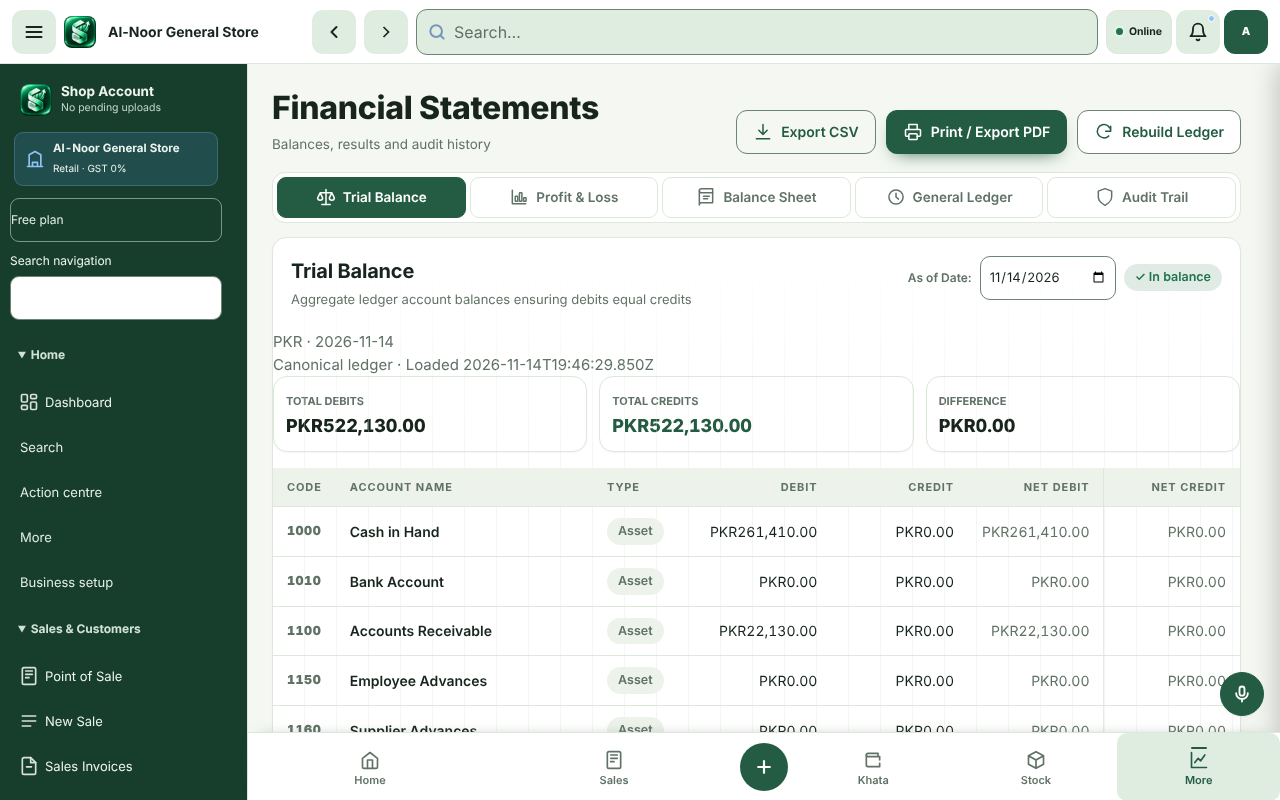
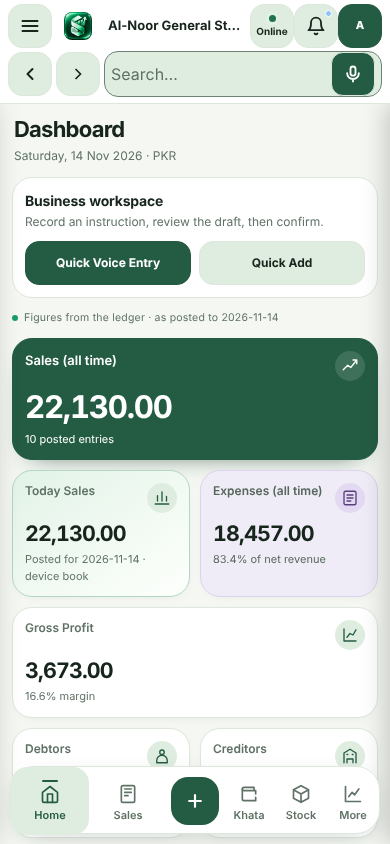
Follow the visual guide, then record your first real sale.
How Shop Account works